Resolution-adaptive rendering
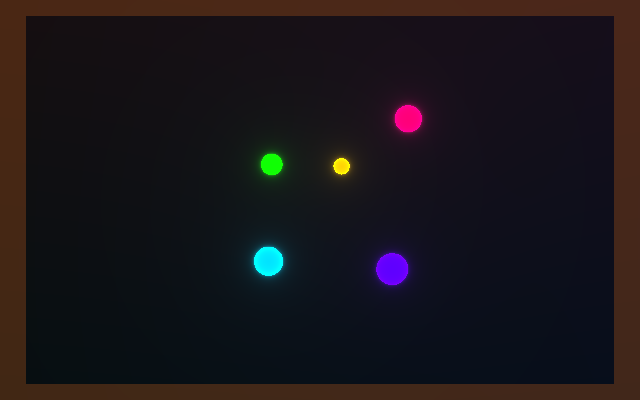
A shader that knows how big its canvas is. The grid lines are two pixels wide whatever the resolution, the five glowing circles stay round whatever the aspect ratio, and the tinted border reports which class the canvas is in: green for square-ish, orange for wide, blue for tall. The player above is wide, so the border is orange; the runtime resizes the canvas with the page, so narrow the window and watch it change.
; Resolution-adaptive rendering: a fullscreen triangle whose picture adapts to; the canvas: an aspect-corrected grid with a line width fixed in pixels; (2 / min(width, height)), five orbiting glowing circles that stay circular at; any aspect ratio, and a border tint that indicates the aspect class (green; square, orange wide, blue tall). Reads width/height/aspect from the; pngine-inputs uniform.
(shader-module :name shader :code """    struct Uniforms {      time: f32,      width: f32,      height: f32,      aspect: f32,    }    @group(0) @binding(0) var<uniform> u: Uniforms;
    const PI: f32 = 3.14159265359;
    @vertex    fn vs(@builtin(vertex_index) i: u32) -> @builtin(position) vec4f {      let x = f32(i & 1u) * 4.0 - 1.0;      let y = f32((i >> 1u) & 1u) * 4.0 - 1.0;      return vec4f(x, y, 0.0, 1.0);    }
    fn sdCircle(p: vec2f, r: f32) -> f32 {      return length(p) - r;    }
    @fragment    fn fs(@builtin(position) pos: vec4f) -> @location(0) vec4f {      // Normalized device coordinates (-1 to 1)      let ndc = vec2f(        (pos.x / u.width) * 2.0 - 1.0,        1.0 - (pos.y / u.height) * 2.0      );
      // Aspect-corrected coordinates (circles stay circular)      var p = ndc;      if (u.aspect > 1.0) {        p.x *= u.aspect;      } else {        p.y /= u.aspect;      }
      let t = u.time;
      // Background gradient      var color = vec3f(0.05 + ndc.y * 0.03, 0.05, 0.08 + ndc.x * 0.02);
      // Adaptive grid (line width scales with resolution)      let minDim = min(u.width, u.height);      let gridSize = 0.15;      let lineWidth = 2.0 / minDim;
      let gx = abs(fract(p.x / gridSize + 0.5) - 0.5);      let gy = abs(fract(p.y / gridSize + 0.5) - 0.5);      let gridDist = min(gx, gy) - lineWidth;      let gridColor = vec3f(0.15, 0.18, 0.22);      color = mix(gridColor, color, smoothstep(0.0, lineWidth, gridDist));
      // Animated circles (always circular regardless of aspect)      for (var i = 0; i < 5; i++) {        let fi = f32(i);        let angle = t * (0.4 + fi * 0.1) + fi * PI * 0.4;        let orbRadius = 0.2 + fi * 0.1;        let center = vec2f(cos(angle), sin(angle)) * orbRadius;
        let circleRadius = 0.06 + sin(t * 2.0 + fi) * 0.02;        let d = sdCircle(p - center, circleRadius);
        // Glow effect        let glow = 0.015 / (abs(d) + 0.008);        let hue = fract(fi * 0.2 + t * 0.05);
        // Simple HSV approximation        let c = clamp(vec3f(          abs(hue * 6.0 - 3.0) - 1.0,          2.0 - abs(hue * 6.0 - 2.0),          2.0 - abs(hue * 6.0 - 4.0)        ), vec3f(0.0), vec3f(1.0));
        if (d < 0.0) {          color = c;        }        color += c * glow * 0.25;      }
      // Corner indicators showing aspect ratio      let corner = max(abs(ndc.x), abs(ndc.y));      if (corner > 0.92) {        var indicator = vec3f(0.2, 0.6, 0.2);  // Green: square-ish        if (abs(u.aspect - 1.0) > 0.1) {          if (u.aspect > 1.0) {            indicator = vec3f(0.6, 0.3, 0.1);  // Orange: wide          } else {            indicator = vec3f(0.1, 0.3, 0.6);  // Blue: tall          }        }        color = mix(color, indicator, 0.4);      }
      return vec4f(color, 1.0);    }  """)
(render-pipeline :name pipeline  :layout auto  (vertex :module shader :entry vs)  (fragment :module shader :entry fs    (target :format preferred-canvas-format)))
(buffer :name uniforms :size 16 :usage [uniform copy-dst])
(queue :name writeUniforms  (write-buffer :buffer uniforms :offset 0 :data pngine-inputs))
(bind-group :name uniformsBindGroup :layout pipeline :group 0  (entry :binding 0 :buffer uniforms))
(render-pass :name mainPass  (color-attachment :view context-current-texture :clear-value [0 0 0 1] :load-op clear :store-op store)  :pipeline pipeline  :bind-groups [uniformsBindGroup]  (draw :vertex-count 3))
(frame :name main :perform [writeUniforms mainPass])examples/samples/28_resolution_adaptive.sjon in the pngine repository.
How it works
Section titled “How it works”The scaffold
Section titled “The scaffold”The fullscreen scaffold from Gradient background,
in SJON, the S-expression format pngine compiles, one form per WebGPU
resource or operation: one shader module, a (render-pipeline …) with
:layout auto targeting the canvas format, a 16-byte uniform buffer
refilled every frame from pngine-inputs (the built-in
time/width/height/aspect source), a bind group, a (render-pass …)
drawing three vertices, and a (frame …). This sample leans on all four
uniform fields (so do spinning shapes and normal mapping; most samples read
only time and the size), and everything it does with them is WGSL,
WebGPU’s shading language, in the fragment stage.
Two coordinate systems
Section titled “Two coordinate systems”ndc maps the pixel to [-1, 1] on both axes regardless of shape, so
|ndc.x| and |ndc.y| near 1 mean “near the edge”: that is what the border
test uses. p is the aspect-corrected copy: on a wide canvas p.x is
scaled by aspect, on a tall one p.y is divided by it, so a unit of p
is the same number of pixels on both axes and circles drawn in p are
round.
Pixel-sized lines
Section titled “Pixel-sized lines”A width fixed in p units would thicken as the canvas grows, and the
promise I made above was two pixels whatever the resolution, so
lineWidth = 2 / min(width, height): two pixels expressed in p units.
gridDist is the distance to the nearest grid line
(abs(fract(p / gridSize + 0.5) - 0.5) on each axis, take the smaller) minus
that width, and smoothstep(0, lineWidth, gridDist) fades from line colour
to background over one more line width. Double the resolution and the lines stay two pixels wide instead of
doubling in thickness.
An exercise: replace 2.0 / minDim with a flat 0.01 and resize the
window. The grid now thickens as the canvas grows, which is precisely the
failure the division was there to prevent.
Circles and the border
Section titled “Circles and the border”Five circles orbit at different radii and rates, each pulsing in size with a
sine; inside d < 0 the colour is the circle’s hue, and a glow
0.015 / (|d| + 0.008) is added around it. The hue comes from a compact
piecewise-linear HSV approximation clamped to [0, 1]. Finally, pixels
with max(|ndc.x|, |ndc.y|) > 0.92 are mixed 40% towards the aspect-class
colour: green unless aspect differs from 1 by more than 0.1, then orange
above 1 and blue below.
In the specifications
Section titled “In the specifications”| What the sample uses | WebGPU | WGSL |
|---|---|---|
| Canvas size reaching the shader | writeBuffer(), canvas configuration |
uniform address space |
| Fullscreen triangle and one draw | draw(), normalized device coordinates |
vertex_index, position |
| Grid and circles | fract, abs, min, max, smoothstep, length, for statement |
|
| Colour and border | clamp, mix, if statement |
Related
Section titled “Related”- Spinning shapes does the simpler one-sided aspect correction.
- The runtime side of resizing is
autoResizein the JavaScript API. - Forms:
(shader-module …),(render-pass …),(queue …).