Multiple triangles
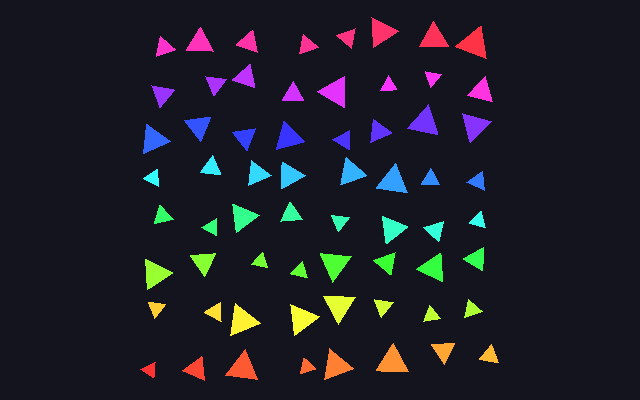
One triangle, drawn 64 times in a single draw call. The mesh is three vertices in one buffer; a second buffer holds one record per instance (position, scale, rotation, colour), and the pipeline declares that its attributes advance per instance rather than per vertex. That second buffer is never written from the document: a compute shader fills it once, before the first frame, so the layout logic lives on the GPU too. I tie each triangle’s spin to its size, so the big ones turn faster.
; Multiple triangles: 64 instanced triangles on a jittered 8×8 grid, each with; its own scale, rotation and rainbow colour, spinning at a rate tied to its; size. A compute `(init …)` seeds the instance buffer once; the render pass; draws it instanced from a per-vertex triangle buffer plus a per-instance; buffer (`:step-mode instance`), animated by a pngine-inputs uniform.; No `(primitive …)` form: the defaults are what it needs.
(define :name NUM_TRIANGLES :value 64)
(shader-module :name initShader :code """struct Triangle {  pos: vec2f,  scale: f32,  rotation: f32,  color: vec3f,  pad: f32,}struct Triangles { data: array<Triangle> }
@binding(0) @group(0) var<storage, read_write> triangles: Triangles;
fn hash(n: u32) -> f32 {  var x = n;  x = ((x >> 16u) ^ x) * 0x45d9f3bu;  x = ((x >> 16u) ^ x) * 0x45d9f3bu;  x = (x >> 16u) ^ x;  return f32(x) / f32(0xffffffffu);}
const NUM: u32 = 64u;const PI: f32 = 3.14159265359;
@compute @workgroup_size(64)fn main(@builtin(global_invocation_id) id: vec3u) {  let i = id.x;  if (i >= NUM) { return; }
  // Grid layout with jitter  let cols = 8u;  let row = i / cols;  let col = i % cols;
  let baseX = (f32(col) / f32(cols - 1u)) * 1.6 - 0.8;  let baseY = (f32(row) / f32(cols - 1u)) * 1.6 - 0.8;
  triangles.data[i].pos = vec2f(    baseX + (hash(i * 7u) - 0.5) * 0.1,    baseY + (hash(i * 11u) - 0.5) * 0.1  );  triangles.data[i].scale = 0.05 + hash(i * 13u) * 0.05;  triangles.data[i].rotation = hash(i * 17u) * PI * 2.0;
  // Rainbow colors  let hue = f32(i) / f32(NUM);  let h = hue * 6.0;  let c = 0.8;  let x = c * (1.0 - abs(fract(h / 2.0) * 2.0 - 1.0));
  var rgb = vec3f(0.0);  let hi = u32(h) % 6u;  if (hi == 0u) { rgb = vec3f(c, x, 0.0); }  else if (hi == 1u) { rgb = vec3f(x, c, 0.0); }  else if (hi == 2u) { rgb = vec3f(0.0, c, x); }  else if (hi == 3u) { rgb = vec3f(0.0, x, c); }  else if (hi == 4u) { rgb = vec3f(x, 0.0, c); }  else { rgb = vec3f(c, 0.0, x); }
  triangles.data[i].color = rgb + 0.2;  triangles.data[i].pad = 0.0;}""")
(shader-module :name renderShader :code """struct Uniforms {  time: f32,  width: f32,  height: f32,  aspect: f32,}@group(0) @binding(0) var<uniform> u: Uniforms;
struct VertexOutput {  @builtin(position) pos: vec4f,  @location(0) color: vec3f,}
@vertexfn vs(  @location(0) vertex: vec2f,  @location(1) instPos: vec2f,  @location(2) instScale: f32,  @location(3) instRotation: f32,  @location(4) instColor: vec3f,  @location(5) pad: f32) -> VertexOutput {  // Animate rotation  let angle = instRotation + u.time * (0.5 + instScale * 2.0);  let c = cos(angle);  let s = sin(angle);
  var pos = vertex * instScale;  pos = vec2f(pos.x * c - pos.y * s, pos.x * s + pos.y * c);  pos += instPos;
  // Aspect ratio correction  pos.x /= u.aspect;
  var out: VertexOutput;  out.pos = vec4f(pos, 0.0, 1.0);  out.color = instColor;  return out;}
@fragmentfn fs(in: VertexOutput) -> @location(0) vec4f {  return vec4f(in.color, 1.0);}""")
; Triangle vertices (one equilateral triangle, drawn per instance).(data :name vertexData :float32 [  0.0 1.0  -0.866 -0.5  0.866 -0.5])
(buffer :name vertexBuffer :usage [vertex]  :data vertexData)
; Instance data: pos(2) scale(1) rotation(1) color(3) pad(1) = 8 floats (32; bytes) × 64 triangles. Seeded by the init compute shader (storage), consumed; as an instance-step vertex buffer.(buffer :name instanceBuffer :size (* NUM_TRIANGLES 8 4) :usage [vertex storage])
(buffer :name uniforms :size 16 :usage [uniform copy-dst])
(queue :name writeUniforms  (write-buffer :buffer uniforms :offset 0 :data pngine-inputs))
(init :name initTriangles :buffer instanceBuffer :module initShader :workgroups [1])
(render-pipeline :name renderPipeline  :layout auto  (vertex :module renderShader :entry vs    (vertex-buffer :array-stride 8 :step-mode vertex      (attribute :shader-location 0 :offset 0 :format float32x2))    (vertex-buffer :array-stride 32 :step-mode instance      (attribute :shader-location 1 :offset 0 :format float32x2)      (attribute :shader-location 2 :offset 8 :format float32)      (attribute :shader-location 3 :offset 12 :format float32)      (attribute :shader-location 4 :offset 16 :format float32x3)      (attribute :shader-location 5 :offset 28 :format float32)))  (fragment :module renderShader :entry fs    (target :format preferred-canvas-format)))
(bind-group :name uniformsBindGroup :layout renderPipeline :group 0  (entry :binding 0 :buffer uniforms))
(render-pass :name mainPass  (color-attachment :view context-current-texture :clear-value [0.08 0.08 0.12 1] :load-op clear :store-op store)  :pipeline renderPipeline  :vertex-buffers [vertexBuffer instanceBuffer]  :bind-groups [uniformsBindGroup]  (draw :vertex-count 3 :instance-count NUM_TRIANGLES))
(frame :name main :init [initTriangles] :perform [writeUniforms mainPass])examples/samples/06_multiple_triangles.sjon in the pngine repository.
How it works
Section titled “How it works”Two vertex buffers, two step modes
Section titled “Two vertex buffers, two step modes”Everything here is SJON, the S-expression format pngine compiles, one form
per WebGPU resource or operation, with the shaders inside as plain WGSL,
WebGPU’s shading language; the form doing the new work is the pipeline’s
(vertex …) stage, which lists two (vertex-buffer …) layouts. The first,
(vertex-buffer :array-stride 8 :step-mode vertex …), is the triangle:
float32x2 positions, one per vertex. The second,
(vertex-buffer :array-stride 32 :step-mode instance …), is the instance
record, five attributes at offsets 0, 8, 12, 16 and 28 filling
@location(1) to @location(5). With :step-mode instance, WebGPU
advances that buffer once per instance instead of once per vertex, so all
three vertices of triangle i see instance i’s record.
(draw :vertex-count 3 :instance-count NUM_TRIANGLES) then draws
3 × 64 vertices; NUM_TRIANGLES is a (define …) constant, usable bare in
any numeric slot.
The instance buffer is born on the GPU
Section titled “The instance buffer is born on the GPU”(buffer :name instanceBuffer :size (* NUM_TRIANGLES 8 4) :usage [vertex storage])
has both usages: STORAGE so a compute shader can write it, VERTEX so
the render pass can read it. (init :name initTriangles :buffer instanceBuffer :module initShader :workgroups [1])
is sugar for a compute pipeline, bind group and pass that run once;
(frame :name main :init [initTriangles] …) places them before the first
frame. initShader writes a Triangle struct per thread: an 8×8 grid
position with a hashed jitter, a hashed scale and rotation, and a rainbow
colour from the index. One workgroup of 64 threads covers all 64 records.
The instance record is described twice, once by the WGSL Triangle struct
the compute shader writes and once by the vertex layout the pipeline reads,
and the two descriptions of the same 32 bytes have to agree:
one Triangle record, 32 bytes (:array-stride 32)
byte      0      4      8      12     16     20     24     28     32          +------+------+------+------+------+------+------+------+          |pos.x |pos.y |scale | rot  |  r   |  g   |  b   | pad  |          +------+------+------+------+------+------+------+------+WGSL       '-- vec2f --' f32    f32   '------ vec3f ------' f32attribute  float32x2 :0  f32 :8 f32 :12  float32x3 :16      f32 :28
vec3f aligns to 16, which is why color sits at byte 16 rather than 12
and why the struct ends in an explicit pad.
An exercise: raise NUM_TRIANGLES to 128. The buffer size and the draw
follow the define on their own; the init pass does not, until its
:workgroups [1] becomes [2], because one workgroup is 64 threads and 64
threads write 64 records.
Animation
Section titled “Animation”vs rotates the vertex by instRotation + time * (0.5 + 2 · instScale), so
big triangles spin faster, scales and offsets it, and divides x by the
aspect ratio from pngine-inputs (the built-in
time/width/height/aspect source, written to the uniform buffer each
frame) so the triangles stay equilateral on the wide canvas.
In the specifications
Section titled “In the specifications”| What the sample uses | WebGPU | WGSL |
|---|---|---|
| Instanced drawing | draw(vertexCount, instanceCount), GPUVertexStepMode, "instance" |
@location inputs |
| Two vertex buffer layouts | vertex state, GPUVertexBufferLayout, GPUVertexAttribute |
structure member layout, alignment and size |
| A buffer that is both storage and vertex | buffer usage, STORAGE, VERTEX |
storage address space, runtime-sized arrays |
| The one-shot compute fill | compute pipelines, dispatchWorkgroups() |
@compute, @workgroup_size, global_invocation_id |
| Hashing and colour | bit expressions (>>, ^), integer types, fract, abs |
Related
Section titled “Related”- Sprite rendering and UI elements instance quads the same way; Instanced trees and Multiple objects do it in 3D with a depth buffer.
- Upstream: the WebGPU Samples instancedCube sample covers the same idea with a uniform array of matrices instead of an instance-step buffer.
- Forms:
(define …),(init …),(buffer …),(render-pipeline …).